Free until 1 February 2027
Delver Lens alternative: keep your MTG collection here
Many scan their cards with Delver Lens and keep the collection somewhere else. ManaCollector can be that place: each copy with its condition, finish and language, where it lies, and prices every night. It reads a CSV file from Delver Lens, so you can try it on your own cards.
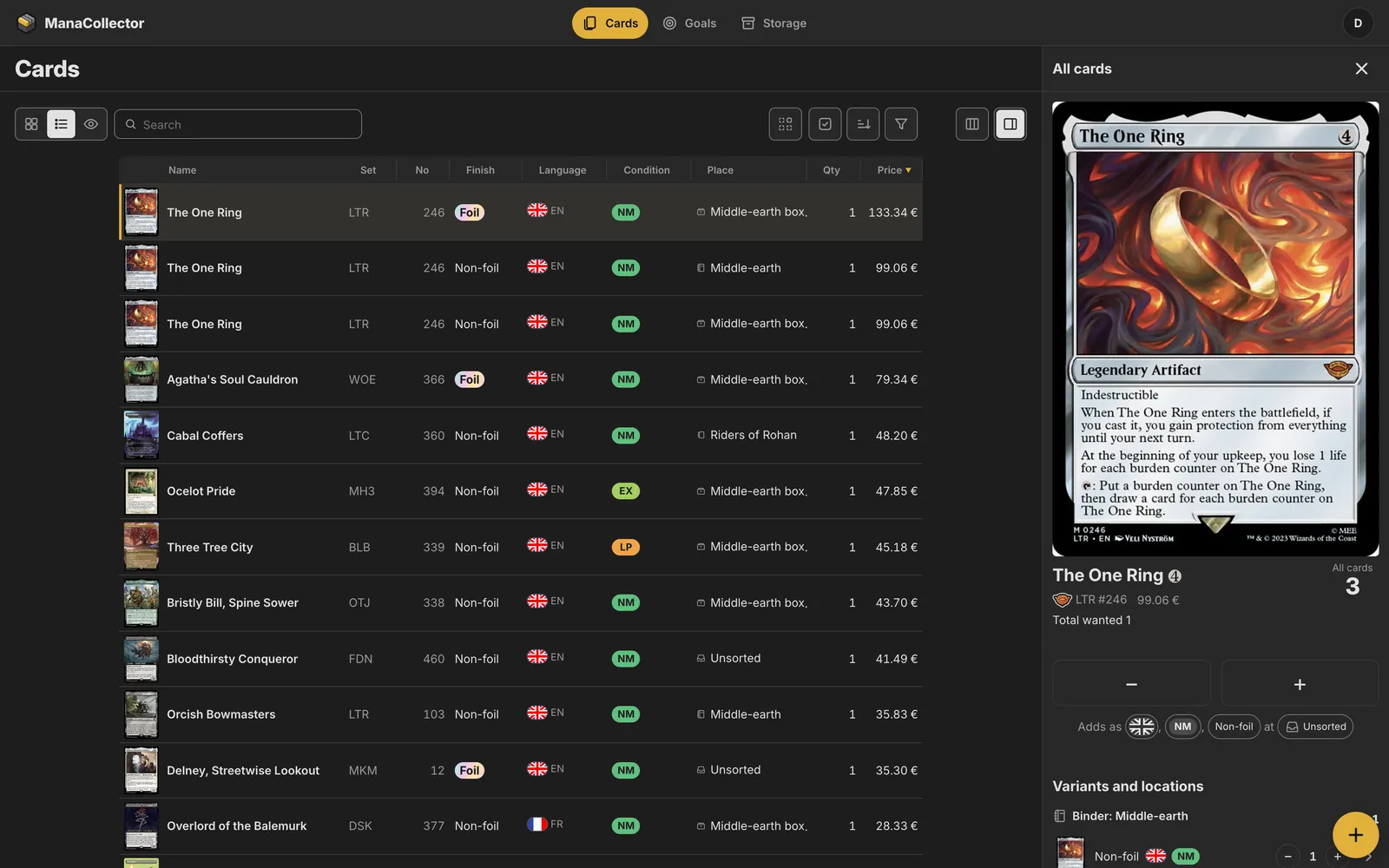
What you get in ManaCollector
- Each copy with its print, finish, language and condition, and marks for trade, proxy or altered.
- Search by name, set code or number: it runs in the browser, so the list changes with every key. Filter by colour, type, rarity, price, place or when a card was added.
- Market prices every night in euros, each card’s price history, and what the collection is worth.
- Binders with pages and pockets, boxes and decks: a card shows where it lies, in a binder the page and the row.
- Goals for a set, a deck or your own list, with what you’re missing and what it costs, and trading with friends you add by username.
- In the browser on a phone, a tablet or a computer, and free on the App Store for iPhone.
How to import your collection from Delver Lens
- In Delver Lens, open the list you scanned into and export it as a CSV file.
- In ManaCollector, open All cards, choose + and List, then CSV file, and pick the file. The columns are read by their names: name, quantity, set code, collector number, foil, language, condition or Scryfall ID. If the columns have other names, you pick which is the name, count, set, number, finish, language and condition once, and it is remembered for the next file with the same columns.
- Each row shows in a list with its picture before anything is saved. Choose where the cards go, Unsorted unless you pick a binder or a box, and add them. One Undo takes the whole file back.
Delver Lens and ManaCollector
Delver Lens is a card scanner app for phones. ManaCollector has a camera scanner of its own that reads cards on the phone, with no picture uploaded, but you can keep scanning in Delver Lens and add each new file here. Delver Lens is its owner’s name; ManaCollector isn’t affiliated with it.
Questions
Can I keep scanning in Delver Lens?
Yes. Export each new scan as a CSV file and add it: the cards come in as new copies, and you see them in the list before anything is saved.
How big a file can I add?
Up to 1,000 rows a file, so a big collection goes in a few files. Each row can hold many copies of a card.
Can I take my cards back out?
Yes. Download your whole collection any time, as CSV or JSON.
Sign up
Anyone can sign up, and everything is free until 1 February 2027. Give your email address and we’ll send you a link to create your account. Then import your collection and try it on your own cards.
More of what it does
Collection tracker
Every copy you own, with search as you type, prices every night and where each card lies.
Move from another app
Bring your cards from the app you use now as a CSV file, and take them out any time.
Scanning and import
Scan cards with the phone’s camera, paste a list, or import a CSV.
Prices and value
Market prices every night, each card’s price history, and what the collection is worth.
Trading with friends
Mark cards for trade, add friends, and see what they have that you need.
Desktop data grid
Search, sort, filter and change many cards at once, in a data grid on your computer.
Set completion
Collect a set, a deck or your own list, and see what’s missing and what it costs.
Binders and boxes
Binders that lay out their pages from a goal, boxes with sections, and deck boxes.
ManaBox alternative
Moving from ManaBox? Import your collection and try it here.